
How to Test
1. SDK Log Switch
Note: The log function must be turned off before the app goes live.
ATSDK.setNetworkLogDebug(true);After enabling the log switch:
- In Android Studio's Logcat, filter by
"secmtp"as the tag to view the SDK logs. - The TopOn SDK will print the following log during initialization, from which you can obtain the device ID.
- If the GAID value is not printed, please check whether the current phone has Google services. You need to use a phone model with Google services for testing.
anythink: ****************************************************************************
anythink: GAID(ADID): b796a53f-61bf-4e91-bc67-d505cdb97cf8 , AndroidID: f669f2b7137d82b9
anythink: ****************************************************************************
Log Example:
anythink_network:
╔═══════════════════════════════════════════════════════════════════════════════════════
║ {
║     "placementId": "b5bbdc725768fa",  // The placement ID that initiated the load
║     "adType": "inter",  // The ad type that initiated the load
║     "mixedFormatAdType": -1,
║     "action": "request_result",  // Action after initiating ad load: request (ad request), request_result (ad return result), impression (ad display), click (ad click), close (ad close)
║     "refresh": 0,
║     "result": "fail",  // Result parameter, success (successful), fail (failed)
║     "segmentId": 0,  // The traffic group of the current ad source. 0 indicates the default group.
║     "adSourceId": "1423289",  // Ad source ID
║     "position": 0,  // The ranking position of the current ad source under the placement
║     "networkType": 6,  // The unique ID used by TopOn to distinguish third-party ad networks. The mapping can be viewed at (https://docs.toponad.com/#/zh-cn/android/android_doc/android_access_doc?id=network_firm_id)
║     "networkName": "Mintegral",  // Ad network name
║     "networkVersion": "MAL_16.1.41",  // Ad network SDK version
║     "networkUnit": "{\"is_video\":\"0\",\"video_muted\":\"0\",\"suport_video\":\"1\",\"appkey\":\"ef13ef712aeb0f6eb3d698c4c08add96\",\"unitid\":\"1726152\",\"appid\":\"100947\"}",  // The configuration of this ad source in the TopOn dashboard (corresponding to the app and placement information of the third-party ad network)
║     "isHB": 0, // Whether it is a header bidding ad source
║     "msg": "code:[ 4001 ]desc:[ Return Ad is empty. ]platformCode:[  ]platformMSG:[ EXCEPTION_UNIT_ADTYPE_ERROR ]",  // If a load failure occurs, the complete error information will be output here
║     "hourly_frequency": 0,  // Number of impressions in the current hour
║     "daily_frequency": 0,  // Number of impressions in the current day
║     "network_list": "6,6,6",  // The list of IDs of the currently requested third-party ad networks, separated by ","
║     "request_network_num": 1,  // Indicates how many third-party ad network ad source loads are initiated simultaneously (corresponds to the parallel request count in the TopOn dashboard Advanced Settings)
║     "handle_class": "com.anythink.network.mintegral.MintegralATInterstitialAdapter"  // The class name that calls the ad network API
║ }
╚═══════════════════════════════════════════════════════════════════════════════════════TUSDK.setNetworkLogDebug(true);After enabling the log switch:
- In Android Studio's Logcat, filter by
"thinkup"as the tag to view the SDK logs. - The TopOn SDK will print the following log during initialization, from which you can obtain the device ID.
- If the GAID value is not printed, please check whether the current phone has Google services. You need to use a phone model with Google services for testing.
thinkup: ****************************************************************************
thinkup: GAID(ADID): b796a53f-61bf-4e91-bc67-d505cdb97cf8 , AndroidID: f669f2b7137d82b9
thinkup: ****************************************************************************
Log Example:
thinkup_network:
╔═══════════════════════════════════════════════════════════════════════════════════════
║ {
║     "placementId": "b5bbdc725768fa",  // The placement ID that initiated the load
║     "adType": "inter",  // The ad type that initiated the load
║     "mixedFormatAdType": -1,
║     "action": "request_result",  // Action after initiating ad load: request (ad request), request_result (ad return result), impression (ad display), click (ad click), close (ad close)
║     "refresh": 0,
║     "result": "fail",  // Result parameter, success (successful), fail (failed)
║     "segmentId": 0,  // The traffic group of the current ad source. 0 indicates the default group.
║     "adSourceId": "1423289",  // Ad source ID
║     "position": 0,  // The ranking position of the current ad source under the placement
║     "networkType": 6,  // The unique ID used by TopOn to distinguish third-party ad networks. The mapping can be viewed at (https://docs.toponad.com/#/zh-cn/android/android_doc/android_access_doc?id=network_firm_id)
║     "networkName": "Mintegral",  // Ad network name
║     "networkVersion": "MAL_16.1.41",  // Ad network SDK version
║     "networkUnit": "{\"is_video\":\"0\",\"video_muted\":\"0\",\"suport_video\":\"1\",\"appkey\":\"ef13ef712aeb0f6eb3d698c4c08add96\",\"unitid\":\"1726152\",\"appid\":\"100947\"}",  // The configuration of this ad source in the TopOn dashboard (corresponding to the app and placement information of the third-party ad network)
║     "isHB": 0, // Whether it is a header bidding ad source
║     "msg": "code:[ 4001 ]desc:[ Return Ad is empty. ]platformCode:[  ]platformMSG:[ EXCEPTION_UNIT_ADTYPE_ERROR ]",  // If a load failure occurs, the complete error information will be output here
║     "hourly_frequency": 0,  // Number of impressions in the current hour
║     "daily_frequency": 0,  // Number of impressions in the current day
║     "network_list": "6,6,6",  // The list of IDs of the currently requested third-party ad networks, separated by ","
║     "request_network_num": 1,  // Indicates how many third-party ad network ad source loads are initiated simultaneously (corresponds to the parallel request count in the TopOn dashboard Advanced Settings)
║     "handle_class": "com.thinkup.network.mintegral.MintegralTUInterstitialAdapter"  // The class name that calls the ad network API
║ }
╚═══════════════════════════════════════════════════════════════════════════════════════
Note:
- If the result field of all action type logs is success, then the ad network is integrated correctly.
- If the result field of a certain log is fail, it means an error occurred in that ad behavior. You need to check the content of the msg field in the log, which has the following format:
"code[ " + code + " ],desc[ " + desc + " ],platformCode[ " + platformCode + " ],platformMSG[ " + platformMSG + " ]"

code: TopOn SDK internal error code
desc: TopOn SDK internal error description
platformCode: Third-party ad network error code (the error code to check when an ad has no fill)
platformMsg: Third-party ad network error message (the error message to check when an ad has no fill)
You can query the relevant TopOn Error Codes based on code, desc. If code=4001, you need to troubleshoot based on platformCode, platformMSG by checking the Third-Party Ad Network Error Codes & FAQ.
2. Testing Ads via the Test Tool
2.1 Test Tool Introduction
- Basic Information: Detect information related to the app, device, and SDK.
- TopOn SDK Settings: Check whether privacy settings and permissions have been successfully configured.
- Integration Check: Check the integration status of third-party platform SDKs and adapters and test suggestions, as well as test ad loading for third-party ad networks.
Note:
- Supports detection and use after integrating the TopOn SDK.
- The test tool is only used for checking SDK integration and cannot replace the APP's own ad logic testing.
- After testing is complete and before going live, the relevant code that calls the test tool must be removed.
- SDK version requirement: v6.2.70 and above.
● Version Information
| TopOn SDK Version | Test Tool Version | Description |
|---|---|---|
| v6.6.21 and above (Recommended) | v1.1.6 | Compatible with higher SDK versions, optimized known issues |
| v6.5.50 and above | v1.1.3 | Compatible with higher SDK versions, optimized known issues |
| v6.4.88 and above | v1.1.2 | Compatible with higher SDK versions, optimized known issues |
| v6.4.87 and below | v1.1.0 | Optimized known issues |
💡Tips: When using the test tool for testing, focus on the following:
- Check whether the integration display of the ad network's SDK is correct.
- Whether the requests, impressions, and clicks for each ad format of the ad network are normal.
2.2 Test Tool Integration
(1) Refer to the TopOn SDK Integration Guide to integrate the SDK.
(2) Import the test tool and add the dependency in build.gradle:
repositories {
    maven {
        url "https://jfrog.anythinktech.com/artifactory/debugger"
    }
}
dependencies {
    // Debugger UI Tools,Refer to the release notes above to replace the version number—for example, 1.1.3
    implementation 'com.anythink.sdk:debugger-ui-tpn:${version}'
}
(3) Launch the test tool
Note: The following method can only be used to access the test tool after initializing the TopOn SDK.
ATDebuggerUITest.showDebuggerUI(context);repositories {
maven {
url "https://jfrog.anythinktech.com/artifactory/debugger"
}
}
dependencies {
// Debugger UI Tools
implementation 'com.thinkup.sdk:debugger-ui:1.1.3'
}(3) Launch the test tool
Note: The following method can only be used to access the test tool after initializing the TopOn SDK.
TUDebuggerUITest.showDebuggerUI(context);2.3 Test Tool Usage
2.3.1 Basic Information
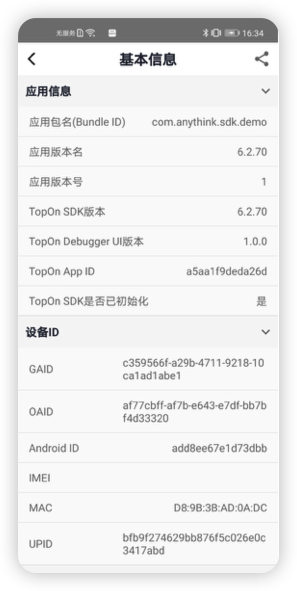
💡Tips: If GAID is empty, the test tool cannot be used normally for testing. If it is empty, please check:
Whether the test phone has Google services installed.
Whether the following methods have been called in the project; both methods will restrict GAID retrieval.
ATSDK.deniedUploadDeviceInfo(DeviceDataInfo.GAID);

ATSDK.setGDPRUploadDataLevel(ATSDK.NONPERSONALIZED);
💡Tips: If GAID is empty, the test tool cannot be used normally for testing. If it is empty, please check:
Whether the test phone has Google services installed.
Whether the following methods have been called in the project; both methods will
restrictGAID retrieval.TUSDK.deniedUploadDeviceInfo(DeviceDataInfo.GAID); TUSDK.setGDPRUploadDataLevel(TUSDK.NONPERSONALIZED);
2.3.2 TopOn SDK Settings
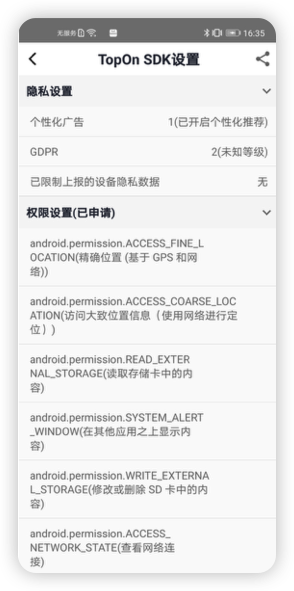
TopOn SDK settings include two parts: Privacy Settings and Permission Settings.
(1) Privacy Settings
Device Privacy Data Restricted from Reporting, GDPR
(2) Permission Settings: The list of permissions that the app has requested.
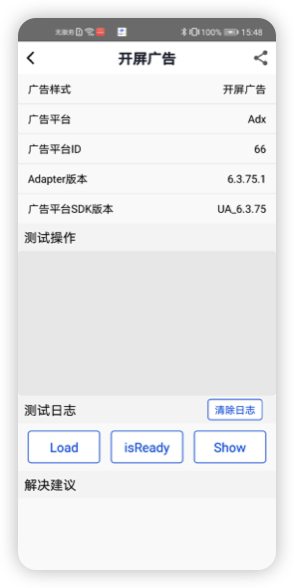
2.3.3 Integration Check
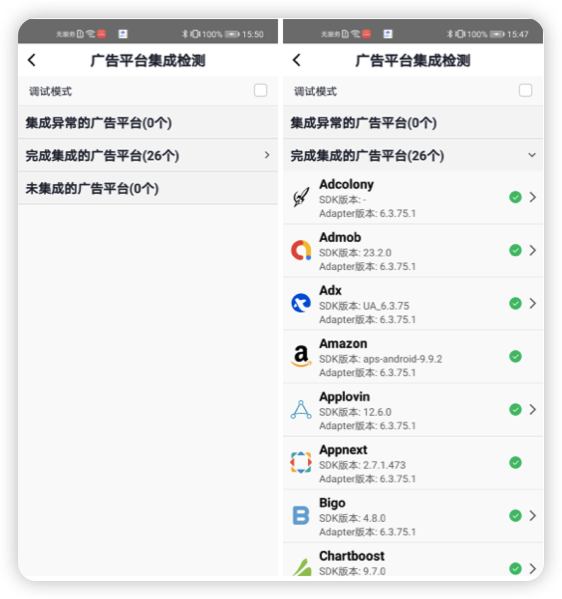
(1) Check the integration status in the ad network list: Integration Abnormal, Integration Complete, Not Integrated.
(2) Toggle the switch to enable debug mode.
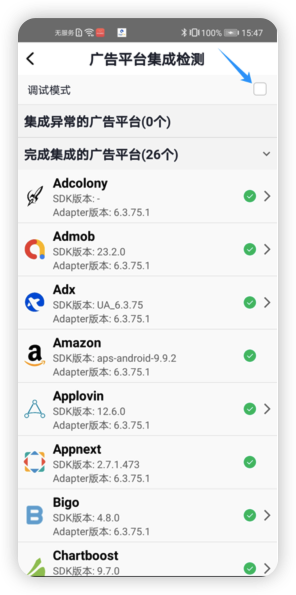
(3) Select an ad network to enter debug mode, and click the share icon in the top right corner to share the ad network information for the current page.
(4) Select the ad format of the ad network for testing.
2.3.4 Online ID Test
Online ID testing supports using placements configured in the TopOn dashboard to test ads, and supports filtering ad sources under a placement for testing.
Note: After running the online ID test, switching back to the developer's app for testing requires restarting the app to avoid cache issues caused by the test placement in the app being the same as the test tool placement.
(1) Prerequisites
- SDK Version: v6.3.68 and above
- Test Tool Version: v1.0.5 and above
- Set the SDK Debug Key: The steps to obtain it are
Log in to Dashboard->Account Management->Key->SDK Debug Key - Debug mode is in the disabled state
(2) Getting Started
Sample code is as follows:
//1. Initialize the SDK
ATSDK.init(context, "your app id", "your app key");
//2. Set the Debug Key to enter the test tool
ATDebuggerUITest.showDebuggerUI(context, "your debug key");//1. Initialize the SDK
TUSDK.init(context, "your app id", "your app key");
//2. Set the Debug Key to enter the test tool
TUDebuggerUITest.showDebuggerUI(context, "your debug key");(3) Online ID List
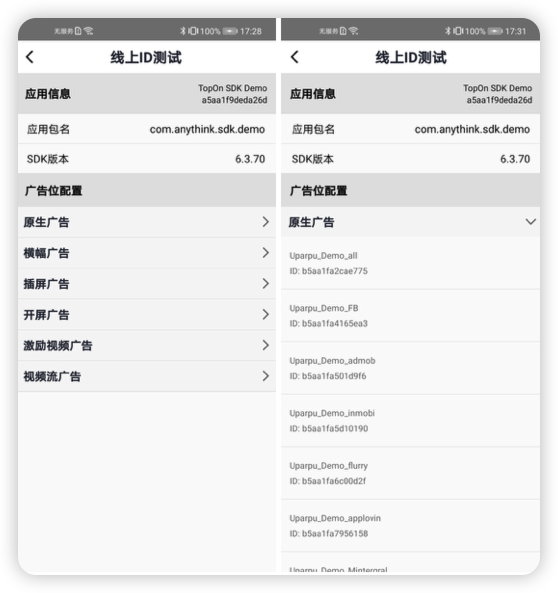
- Supports viewing app information: app name, App ID, app package name, SDK version.
- Supports viewing the list of placements configured under the app.
- Supports viewing placement information: name, ID.
- Supports clicking on a placement to navigate to the placement test page for testing (video streaming ads are temporarily not supported for testing).
(4) Placement Test
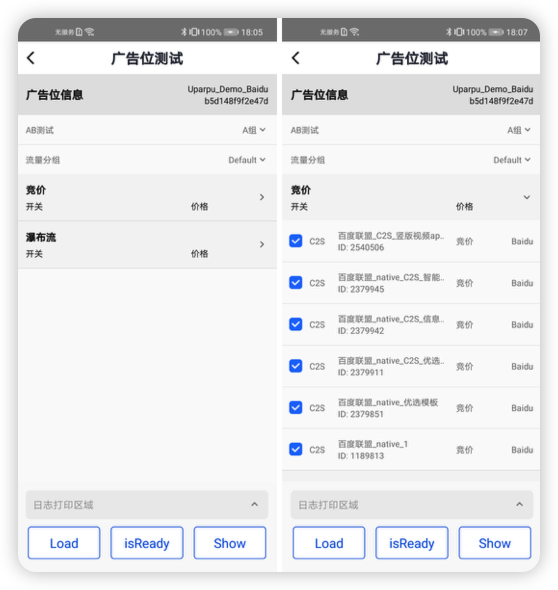
- Supports switching traffic groups.
- Supports bidding and waterfall ad sources.
- Supports filtering ad sources: unchecked ad sources will be filtered when initiating a load.
3. Testing Ads via Debug Mode
- Using debug mode, you can lock onto a single ad network, use TopOn's pre-configured test ad sources, and test and verify the ad network integration.
- After the test begins, you first need to enable the SDK's log function and obtain the test device ID; then call the API for each ad network to configure the test device, test ad network, and test ad type, enabling debug mode; finally, execute the corresponding adjustments based on the log output results.
- Each ad network has its own separate method, and different ad formats have different parameter configurations. Please select the method to call based on the ad network and ad format you need to test. For the ad formats supported by each ad network, please refer to: Mediation Platform Overview
- We recommend calling the API for configuration before initializing the TopOn SDK.
- After configuration is complete, all placements on the test device will only request the test ad source of the specified ad network in the configuration.
Note:
- For bidding ad sources, this configuration only supports Meta (Facebook) and TopOn ADX. Other bidding ad sources cannot be tested via this method.
- When testing overseas ad networks, you need to proxy to an overseas network. For InMobi, it is recommended to proxy to Southeast Asia, with India being the best. For Pangle, proxy to a non-US region. For the Meta platform, the Facebook app must be installed on the test phone, and the fill rate is relatively low, possibly requiring multiple attempts. For other overseas platforms, when loading ads, you can try proxying to the country/region where the platform is located to increase the ad fill rate.
3.1 Ad Networks Supported by Debug Mode
● Meta (Bidding)
Tips:
- Meta has a high fill rate in the US.
- The Facebook app must be installed on the test device.
- Facebook must be in a logged-in state, and the account must function normally.
- The App ID and Placement ID prefixes of the Meta ad source must match.
// General setup
ATSDK.setDebuggerConfig(context, GAID, new ATDebuggerConfig.Builder(Facebook_NETWORK).build());
// Advanced usage
ATSDK.setDebuggerConfig(context, AndroidID,new ATDebuggerConfig.Builder(Facebook_NETWORK).setNativeType(nativeType).build());
Parameter description:
nativeType: Set the native ad type. Supports the following types:
    Facebook_NATIVE_SELF_RENDER: Native Ad (Self-Rendering)
    Facebook_NATIVE_BANNER_TEMPLATE: Native Banner Ad (Template Rendering)
    Facebook_NATIVE_TEMPLATE: Native Ad (Template Rendering)
    Facebook_NATIVE_BANNER_SELF_RENDER: Native Banner Ad (Self-Rendering)
● AdMob
Tips:
- AdMob has a high fill rate in the US.
- Google Play must be available on the test device and GAID must be obtainable.
// General setup
ATSDK.setDebuggerConfig(context, GAID, new ATDebuggerConfig.Builder(Admob_NETWORK).build());
// Advanced usage
ATSDK.setDebuggerConfig(context, AndroidID, new ATDebuggerConfig.Builder(Admob_NETWORK).setNativeType(nativeType).setInterstitial(interType).build());
Parameter description:
nativeType: Set the native ad type. Supports the following types:
    Admob_NATIVE_IMAGE: Image
    Admob_NATIVE_VIDEO: Video
interType: Set the interstitial ad type. Supports the following types:
    Admob_INTERSTITIAL_IMAGE: Interstitial Image
    Admob_INTERSTITIAL_VIDEO: Interstitial Video
● Mintegral
Tips: High fill rate in Europe and the Americas.
// General setup
ATSDK.setDebuggerConfig(context, GAID, new ATDebuggerConfig.Builder(Mintegral_NETWORK) .setInterstitial(Mintegral_INTERSTITIAL_VIDEO).build());
// Advanced usage
ATSDK.setDebuggerConfig(context, AndroidID, new ATDebuggerConfig.Builder(Mintegral_NETWORK).setNativeType(nativeType).build());
Parameter description:
nativeType: Set the native ad type. Supports the following types:
    Mintegral_NATIVE_SELF_RENDER: Native Custom Rendering
    Mintegral_NATIVE_TEMPLATE: Native Auto Rendering
● Huawei
Tips: Must use an overseas version Huawei phone (language cannot be China-Chinese, US-English) or a phone with HMS Core installed.
// General setup
ATSDK.setDebuggerConfig(context, GAID, new ATDebuggerConfig.Builder(Huawei_NETWORK).build());
// Advanced usage
ATSDK.setDebuggerConfig(context, AndroidID, new ATDebuggerConfig.Builder(Huawei_NETWORK).setNativeType(nativeType).setInterstitial(interType).build());
Parameter description:
nativeType: Set the native ad type. Supports the following types:
    Huawei_NATIVE_VIDEO: Video
    Huawei_NATIVE_IMAGE: Small Image
    Huawei_NATIVE_BIG_IMAGE: Large Image
interType: Set the interstitial ad type. Supports the following types:
    Huawei_INTERSTITIAL_IMAGE: Interstitial Image
    Huawei_INTERSTITIAL_VIDEO: Interstitial Video
● ADX
// General setup
ATSDK.setDebuggerConfig(context, GAID, new ATDebuggerConfig.Builder(Adx_NETWORK).build());
// Advanced usage
ATSDK.setDebuggerConfig(context, AndroidID, new ATDebuggerConfig.Builder(Adx_NETWORK).setNativeType(nativeType).setInterstitial(interType).setBannerType(bannerType).build());
Parameter description:
nativeType: Set the native ad type. Supports the following types:
    ADX_NATIVE_EXPRESS_LEFT_PIC_RIGHT_TEXT: Left Image Right Text
    ADX_NATIVE_EXPRESS_LEFT_TEXT_RIGHT_PIC: Left Text Right Image
    ADX_NATIVE_EXPRESS_TOP_PIC_BOTTOM_TEXT: Top Image Bottom Text
    ADX_NATIVE_EXPRESS_TOP_TEXT_BOTTOM_PIC: Top Text Bottom Image
    ADX_NATIVE_SELF_RENDER: Self-Rendering
interType: Set the interstitial ad type. Supports the following types:
    Adx_INTERSTITIAL_FULL_SCREEN: Full-Screen Interstitial
    Adx_INTERSTITIAL_HALF_SCREEN: Half-Screen Interstitial
bannerType: Set the banner ad type. Supports the following types:
    ADX_BANNER_SIZE_320_50: 320x50 size
    ADX_BANNER_SIZE_320_90: 320x90 size
    ADX_BANNER_SIZE_300_250: 300x250 size
    ADX_BANNER_SIZE_728_90: 728x90 size
● InMobi
Tips: InMobi has a high fill rate in India.
// General setup
ATSDK.setDebuggerConfig(context, GAID, new ATDebuggerConfig.Builder(Inmobi_NETWORK).build());
● AppLovin
Tips: High fill rate in China and the US.
// General setup
ATSDK.setDebuggerConfig(context, GAID, new ATDebuggerConfig.Builder(Applovin_NETWORK).build());
● Chartboost
Tips: High fill rate in China and the US.
// General setup
ATSDK.setDebuggerConfig(context, GAID, new ATDebuggerConfig.Builder(Chartboost_NETWORK).build());
● IronSource
Tips: High fill rate in China.
// General setup
ATSDK.setDebuggerConfig(context, GAID, new ATDebuggerConfig.Builder(Ironsource_NETWORK).build());
● Unity Ads
Tips: High fill rate in the US.
// General setup
ATSDK.setDebuggerConfig(context, GAID, new ATDebuggerConfig.Builder(UnityAds_NETWORK).build());
● Vungle
Tips
- Test suggestion: First VPN to the US, then uninstall and reinstall the app before loading the ad.
- If the bidding debug mode still cannot succeed, you can add a test device in the Vungle dashboard. How to use test mode and test devices – Vungle CN
// General setup
ATSDK.setDebuggerConfig(context, GAID, new ATDebuggerConfig.Builder(Vungle_NETWORK).build());
● Start.io
// General setup
ATSDK.setDebuggerConfig(context, GAID, new ATDebuggerConfig.Builder(StartApp_NETWORK).build());
● MyTarget
// General setup
ATSDK.setDebuggerConfig(context, GAID, new ATDebuggerConfig.Builder(MyTarget_NETWORK).build());
● Fyber
// General setup
ATSDK.setDebuggerConfig(context, GAID, new ATDebuggerConfig.Builder(Fyber_NETWORK).build());
● Pangle
Tips: High fill rate in South Korea and Japan.
// General setup
ATSDK.setDebuggerConfig(context, GAID, new ATDebuggerConfig.Builder(Pangle_NETWORK).build());
● Bigo
Tips: High fill rate in Singapore.
// General setup
ATSDK.setDebuggerConfig(context, GAID, new ATDebuggerConfig.Builder(BigoAds_NETWORK).build());
● Kwai
// General setup
ATSDK.setDebuggerConfig(context, GAID, new ATDebuggerConfig.Builder(KWAI_NETWORK).build());
● Meta (Bidding)
Tips
- Meta has a high fill rate in the US.
- The Facebook app must be installed on the test device.
- Facebook must be logged in and the account must be usable.
- The App ID and Placement ID prefix of the Meta ad source must be consistent.
// General setup
TUSDK.setDebuggerConfig(context, GAID, new TUDebuggerConfig.Builder(Facebook_NETWORK).build());
// Advanced usage
TUSDK.setDebuggerConfig(context, AndroidID,new TUDebuggerConfig.Builder(Facebook_NETWORK).setNativeType(nativeType).build());
Parameters:
nativeType: Set the native ad type. Supports the following types:
    Facebook_NATIVE_SELF_RENDER: Native Ad (Self-Rendering)
    Facebook_NATIVE_BANNER_TEMPLATE: Native Banner Ad (Template Rendering)
    Facebook_NATIVE_TEMPLATE: Native Ad (Template Rendering)
    Facebook_NATIVE_BANNER_SELF_RENDER: Native Banner Ad (Self-Rendering)
● AdMob
Tips
- AdMob has a high fill rate in the US.
- The test device must have Google Play and be able to obtain the GAID.
// General setup
TUSDK.setDebuggerConfig(context, GAID, new TUDebuggerConfig.Builder(Admob_NETWORK).build());
// Advanced usage
TUSDK.setDebuggerConfig(context, AndroidID, new TUDebuggerConfig.Builder(Admob_NETWORK).setNativeType(nativeType).setInterstitial(interType).build());
Parameters:
nativeType: Set the native ad type. Supports the following types:
    Admob_NATIVE_IMAGE: Image
    Admob_NATIVE_VIDEO: Video
interType: Set the Interstitial ad type. Supports the following types:
    Admob_INTERSTITIAL_IMAGE: Interstitial Image
    Admob_INTERSTITIAL_VIDEO: Interstitial Video
● Mintegral
Tips: High fill rate in Europe and the Americas.
// General setup
TUSDK.setDebuggerConfig(context, GAID, new TUDebuggerConfig.Builder(Mintegral_NETWORK) .setInterstitial(Mintegral_INTERSTITIAL_VIDEO).build());
// Advanced usage
TUSDK.setDebuggerConfig(context, AndroidID, new TUDebuggerConfig.Builder(Mintegral_NETWORK).setNativeType(nativeType).build());
Parameters:
nativeType: Set the native ad type. Supports the following types:
    Mintegral_NATIVE_SELF_RENDER: Native Custom Rendering
    Mintegral_NATIVE_TEMPLATE: Native Auto Rendering
● Huawei
Tips: A Huawei phone with an overseas version (language cannot be China-Chinese, US-English) or a phone with HMS Core installed is required.
// General setup
TUSDK.setDebuggerConfig(context, GAID, new TUDebuggerConfig.Builder(Huawei_NETWORK).build());
// Advanced usage
TUSDK.setDebuggerConfig(context, AndroidID, new TUDebuggerConfig.Builder(Huawei_NETWORK).setNativeType(nativeType).setInterstitial(interType).build());
Parameters:
nativeType: Set the native ad type. Supports the following types:
    Huawei_NATIVE_VIDEO: Video
    Huawei_NATIVE_IMAGE: Small Image
    Huawei_NATIVE_BIG_IMAGE: Large Image
interType: Set the Interstitial ad type. Supports the following types:
    Huawei_INTERSTITIAL_IMAGE: Interstitial Image
    Huawei_INTERSTITIAL_VIDEO: Interstitial Video
● ADX
// General setup
TUSDK.setDebuggerConfig(context, GAID, new TUDebuggerConfig.Builder(Adx_NETWORK).build());
// Advanced usage
TUSDK.setDebuggerConfig(context, AndroidID, new TUDebuggerConfig.Builder(Adx_NETWORK).setNativeType(nativeType).setInterstitial(interType).setBannerType(bannerType).build());
Parameters:
nativeType: Set the native ad type. Supports the following types:
    ADX_NATIVE_EXPRESS_LEFT_PIC_RIGHT_TEXT: Image Left, Text Right
    ADX_NATIVE_EXPRESS_LEFT_TEXT_RIGHT_PIC: Text Left, Image Right
    ADX_NATIVE_EXPRESS_TOP_PIC_BOTTOM_TEXT: Image Top, Text Bottom
    ADX_NATIVE_EXPRESS_TOP_TEXT_BOTTOM_PIC: Text Top, Image Bottom
    ADX_NATIVE_SELF_RENDER: Self-Rendering
interType: Set the Interstitial ad type. Supports the following types:
    Adx_INTERSTITIAL_FULL_SCREEN: Full-Screen Interstitial
    Adx_INTERSTITIAL_HALF_SCREEN: Half-Screen Interstitial
bannerType: Set the Banner ad type. Supports the following types:
    ADX_BANNER_SIZE_320_50: 320x50 Size
    ADX_BANNER_SIZE_320_90: 320x90 Size
    ADX_BANNER_SIZE_300_250: 300x250 Size
    ADX_BANNER_SIZE_728_90: 728x90 Size
● InMobi
Tips: InMobi has a high fill rate in India.
// General setup
TUSDK.setDebuggerConfig(context, GAID, new TUDebuggerConfig.Builder(Inmobi_NETWORK).build());
● AppLovin
Tips: High fill rate in China and the US.
// General setup
TUSDK.setDebuggerConfig(context, GAID, new TUDebuggerConfig.Builder(Applovin_NETWORK).build());
● Chartboost
Tips: High fill rate in China and the US.
// General setup
TUSDK.setDebuggerConfig(context, GAID, new TUDebuggerConfig.Builder(Chartboost_NETWORK).build());
● IronSource
Tips: High fill rate in China.
// General setup
TUSDK.setDebuggerConfig(context, GAID, new TUDebuggerConfig.Builder(Ironsource_NETWORK).build());
● Unity Ads
Tips: High fill rate in the US.
// General setup
TUSDK.setDebuggerConfig(context, GAID, new TUDebuggerConfig.Builder(UnityAds_NETWORK).build());
● Vungle
Tips
- Test suggestion: First VPN to the US, then uninstall and reinstall the app before loading the ad.
- If the bidding debug mode still cannot succeed, you can add a test device in the Vungle dashboard. How to use test mode and test devices – Vungle CN
// General setup
TUSDK.setDebuggerConfig(context, GAID, new TUDebuggerConfig.Builder(Vungle_NETWORK).build());
● Start.io
// General setup
TUSDK.setDebuggerConfig(context, GAID, new TUDebuggerConfig.Builder(StartApp_NETWORK).build());
● MyTarget
// General setup
TUSDK.setDebuggerConfig(context, GAID, new TUDebuggerConfig.Builder(MyTarget_NETWORK).build());
● Fyber
// General setup
TUSDK.setDebuggerConfig(context, GAID, new TUDebuggerConfig.Builder(Fyber_NETWORK).build());
● Pangle
Tips: High fill rate in South Korea and Japan.
// General setup
TUSDK.setDebuggerConfig(context, GAID, new TUDebuggerConfig.Builder(Pangle_NETWORK).build());
● Bigo
Tips: High fill rate in Singapore.
// General setup
TUSDK.setDebuggerConfig(context, GAID, new TUDebuggerConfig.Builder(BigoAds_NETWORK).build());
● Kwai
// General setup
TUSDK.setDebuggerConfig(context, GAID, new TUDebuggerConfig.Builder(KWAI_NETWORK).build());
3.2 Platforms Not Supported by Debug Mode
For platforms not supported by debug mode, you can use the test IDs from the TopOn Demo for testing.
- Based on the output logs, verify the ad source. From the Logcat log output, you can see the tracking of various ad actions.
- After calling the API to configure the test rules, you can begin performing various ad actions.
- Locate the placement to be verified by
placementId.
4. GDPR Verification
(1) Switch the network to the EU region.
(2) Action: Start the app for the first time. Expected: A GDPR consent dialog pops up.
(3) Action: Do not click any button; kill the app and restart. Expected: The GDPR consent dialog pops up again (as long as consent is not granted, the consent dialog will appear every time the app starts).
(4) Action: After clicking to authorize GDPR, kill the app and restart. Expected: The GDPR consent dialog does not appear.
;}.cls-2{fill:%230868f7;}.cls-3{fill:url(%23未命名的渐变_44);}.cls-4{fill:%23333;}%3c/style%3e%3clinearGradient%20id='未命名的渐变_8'%20x1='33.73'%20y1='100.61'%20x2='-0.03'%20y2='-1.06'%20gradientUnits='userSpaceOnUse'%3e%3cstop%20offset='0'%20stop-color='%237ae9fb'/%3e%3cstop%20offset='0.67'%20stop-color='%232b90f8'/%3e%3cstop%20offset='1'%20stop-color='%230868f7'/%3e%3c/linearGradient%3e%3clinearGradient%20id='未命名的渐变_44'%20x1='27.86'%20y1='18.67'%20x2='68.36'%20y2='22.22'%20gradientUnits='userSpaceOnUse'%3e%3cstop%20offset='0'%20stop-color='%235ac7f2'/%3e%3cstop%20offset='1'%20stop-color='%230868f7'/%3e%3c/linearGradient%3e%3c/defs%3e%3cpath%20class='cls-1'%20d='M29,28.74V81.91l-9.51-3.68v0L8.52,74A7.17,7.17,0,0,1,4,67.32V24.54A3.76,3.76,0,0,1,9.08,21Z'/%3e%3cpath%20class='cls-2'%20d='M68.09,78.07a13.15,13.15,0,0,1-17.9,12.06L29,81.91h0V28.74L50.19,37A13.17,13.17,0,0,0,68.08,25.3h0Z'/%3e%3cpath%20class='cls-3'%20d='M68.08,25.3a13.19,13.19,0,0,1-6.73,10.87A13.09,13.09,0,0,1,50.19,37L29,28.74V6A3.76,3.76,0,0,1,34.1,2.52l25.59,9.91A13.22,13.22,0,0,1,68.08,25.3Z'/%3e%3cpath%20class='cls-4'%20d='M129.06,81.76a4.33,4.33,0,0,1-3.19-1.31,4.4,4.4,0,0,1-1.31-3.24V56.86H97.65V77.21a4.36,4.36,0,0,1-1.35,3.2A4.68,4.68,0,0,1,93,81.76a4.32,4.32,0,0,1-3.19-1.31,4.37,4.37,0,0,1-1.32-3.24V27.27A4.58,4.58,0,0,1,89.83,24a4.59,4.59,0,0,1,7.82,3.27V48.15h26.91V27.27A4.58,4.58,0,0,1,125.91,24a4.59,4.59,0,0,1,7.82,3.27V77.21a4.37,4.37,0,0,1-1.36,3.2A4.65,4.65,0,0,1,129.06,81.76Z'/%3e%3cpath%20class='cls-4'%20d='M163.77,81.66c-6.57,0-11.76-1.92-15.44-5.7s-5.54-9.07-5.54-15.74a26.76,26.76,0,0,1,2.09-10.43,17.72,17.72,0,0,1,6.67-8.06,19.15,19.15,0,0,1,10.68-2.95,19,19,0,0,1,10.46,2.8,18.7,18.7,0,0,1,6.55,7.36,22.53,22.53,0,0,1,2.36,10.28A4.51,4.51,0,0,1,177,63.77H152.23a10.8,10.8,0,0,0,3.49,6.65c2,1.68,4.88,2.52,8.66,2.52a22.25,22.25,0,0,0,7.54-1.21c.74-.3,1.55-.67,2.37-1.07a3.75,3.75,0,0,1,1.84-.4,4.09,4.09,0,0,1,3,1.15,4,4,0,0,1,1.12,3,4.38,4.38,0,0,1-2.58,3.82,32.34,32.34,0,0,1-6.36,2.61A28.67,28.67,0,0,1,163.77,81.66ZM172.4,55.9a9.72,9.72,0,0,0-1.63-4.56A9.9,9.9,0,0,0,167,48a10.38,10.38,0,0,0-4.64-1.14,12,12,0,0,0-4.77,1.06,9.54,9.54,0,0,0-4.89,5.66,11.78,11.78,0,0,0-.51,2.3Z'/%3e%3cpath%20class='cls-4'%20d='M193,81.64a4.49,4.49,0,0,1-4.51-4.55V27.28A4.58,4.58,0,0,1,189.84,24a4.48,4.48,0,0,1,3.28-1.36A4.36,4.36,0,0,1,196.35,24a4.46,4.46,0,0,1,1.31,3.31V77.09a4.34,4.34,0,0,1-1.35,3.2A4.67,4.67,0,0,1,193,81.64Z'/%3e%3cpath%20class='cls-4'%20d='M263.79,81.71a5.7,5.7,0,0,1-4.2-1.74,5.76,5.76,0,0,1-1.73-4.19V27.37a4.58,4.58,0,0,1,1.35-3.27A4.59,4.59,0,0,1,267,27.37V72.53h24a4.58,4.58,0,0,1,3.27,7.82A4.66,4.66,0,0,1,291,81.71Z'/%3e%3cpath%20class='cls-4'%20d='M424.48,81.74a4.71,4.71,0,0,1-2.71-.88,5.43,5.43,0,0,1-1-1l-.07-.09-12.41-17-5.41,5v9.44a4.31,4.31,0,0,1-1.36,3.19,4.66,4.66,0,0,1-3.3,1.36A4.29,4.29,0,0,1,395,80.42a4.36,4.36,0,0,1-1.32-3.23V27.37A4.58,4.58,0,0,1,395,24.1a4.52,4.52,0,0,1,6.58.12,4.54,4.54,0,0,1,1.24,3.15V56.31l17.72-16.38.05,0a4.8,4.8,0,0,1,2.94-1.11,4.4,4.4,0,0,1,3.27,1.2,4.57,4.57,0,0,1,1.2,3.27,4.44,4.44,0,0,1-.77,2.33,7.45,7.45,0,0,1-1.43,1.65l-11,9.64,13.34,17.68a5,5,0,0,1,1,2.71,4.12,4.12,0,0,1-1.36,3.24A4.64,4.64,0,0,1,424.48,81.74Z'/%3e%3cpath%20class='cls-4'%20d='M317.93,81.76a21.5,21.5,0,1,1,21.17-21.5A21.37,21.37,0,0,1,317.93,81.76Zm0-34.1a12.61,12.61,0,1,0,12.42,12.6A12.52,12.52,0,0,0,317.93,47.66Z'/%3e%3cpath%20class='cls-4'%20d='M212.18,101.22a4.12,4.12,0,0,1-3.05-1.26,4.17,4.17,0,0,1-1.26-3.1V43.34a4.37,4.37,0,0,1,1.3-3.14,4.26,4.26,0,0,1,3.13-1.3,4.19,4.19,0,0,1,3.1,1.26,4.32,4.32,0,0,1,1.26,3.16,20.77,20.77,0,0,1,13-4.54,21.51,21.51,0,0,1,0,43,20.51,20.51,0,0,1-13-4.57V96.86a4.15,4.15,0,0,1-1.3,3.06A4.5,4.5,0,0,1,212.18,101.22Zm17.43-53.63c-6.23,0-12.93,4.11-12.93,12.72a12.73,12.73,0,0,0,25.46,0A12.71,12.71,0,0,0,229.61,47.59Z'/%3e%3cpath%20class='cls-4'%20d='M365.76,81.76a21.5,21.5,0,1,1,21.18-21.5A21.37,21.37,0,0,1,365.76,81.76Zm0-34.1a12.61,12.61,0,1,0,12.42,12.6A12.52,12.52,0,0,0,365.76,47.66Z'/%3e%3c/svg%3e)